How to Fix a Failed Database Content Index for Exchange Server 2013
Last week I was facing the problem that user of exchange server 2013 couldn’t search mail or contact in outlook. I had the same problem before, the reason is damaged index! We have to repair the index file, therefore, exchange server able to search throw the contact.
That is not a big operation and also no needs to have downtime and you can do it during server usage without any side effect, well you have to stop exchange search service but as far as your client cannot search anyway there is no side effect. This exchange server is not the member of DAG or Database Availability Group.
Look for the problem:
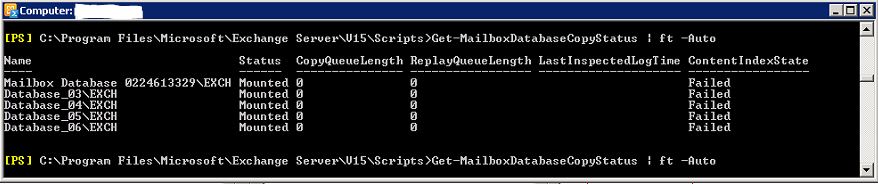
First of all, I just ran the command to see DBs status. As you see in the picture, unfortunately, all databases effected! On the column CountentIndeState I have Failed for all DBs. You may have normal status for one or some of your DBs which should see the Healthy instead of Failed. But you have to follow the same structure and just run repair procedure only for your failed DBs.
Get-MailboxDatabaseCopyStatus | ft -Auto
How to reseed the search catalog:
1. You have to stop exchange server search service: run the following command for stop 2 services in the power shell or use UI to stop 2 services Microsoft Exchange Search Host Controller and Microsoft Exchange Search. I prefer to use power shell and of course with administrative privilege
stop-service MSExchangeFastSearch
stop-service HostControllerService
2. Navigate to the location of the content index for the affected database: you will find in the same folder that the database file is located in. and of course, you just need to do it for defected DBs. For example, if your database is located in F:\Database\DB_01 you will find it in the same path.
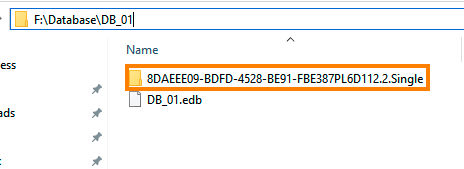
3. Rename the folder: now you have to either delete this folder or rename it. I prefer to rename it and usually just add “.old” at the end of the folder name. you need to repeat for all other failed databases.
4. Start the search services again: okay time to start the exchange search services again. Now you will see that the new folder will be created and content index will rebuild. It may even take few hours depending your server resource and load. If you run Get-MailboxDatabaseCopyStatus | ft -Auto you will see the state crawling which means reseeding of the search catalog is in progress. When the reseeding is complete, this value has to change to Healthy.